Let Claude Code, Codex & ChatGPT Click, Screenshot & Automate Any Browser
Perplexity Comet blocks third-party AI extensions from attaching chrome.debugger due to hardcoded policy restrictions, and Arc/Brave miss Native Messaging bridges. Unlocker for AI Agents in Comet unlocks them all in one click—and survives browser updates automatically.
❌ Without Unlocker for AI Agents in Comet
Comet injects runtime_blocked_hosts into Chromium's default policy, tripping ExtensionDebuggerStrictPolicyRestrictions on every website:
at chrome.debugger.attach (debugger_api.cc)
✗ Clicks, Screenshots & JS Evaluation blocked
✗ NativeMessagingHosts missing in Comet & Arc
✅ With Unlocker for AI Agents in Comet
Native macOS companion + toolbar extension neutralizes strict debugger policy checks and links all AI bridges automatically:
✓ Claude Code (/chrome) + Claude Extension: LINKED
✓ OpenAI Codex / ChatGPT Bridge: LINKED
✓ Auto-Heal LaunchAgent: Survives App Updates
Up and running in 3 steps
1. Get the extension
Install Unlocker for AI Agents in Comet from the Chrome Web Store into Perplexity Comet.
2. Buy & download
Pick a plan below. After checkout the customer portal shows your license key and the macOS app (see the guide below).
3. Open the app
Unzip, double-click the app, paste your key. Restart Comet and open the extension: it shows UNLOCKED.
Simple, Developer-Friendly Pricing
Instant license delivery + macOS Native Companion + Browser Extension Widget
Monthly Pro
Great for trying out or short-term automation workflows.
- Unlocks Perplexity Comet
chrome.debugger - Auto-links Claude Code, Claude & OpenAI Codex
- Supports Comet, Arc, Brave, Dia, Vivaldi & Chrome
- Toolbar Extension Live Status Widget
- Cancel anytime in 1 click
Yearly Pro
One payment a year — about $1.67 a month.
- Everything in Monthly Pro
- Auto-Heal macOS LaunchAgent (Survives Comet updates)
- One Mac per license key
- All updates for new Chromium browsers included
After checkout: get your key & the app
Polar sends you to your customer portal right after payment. If you closed it, open the link in the confirmation email or sign in with your purchase email.
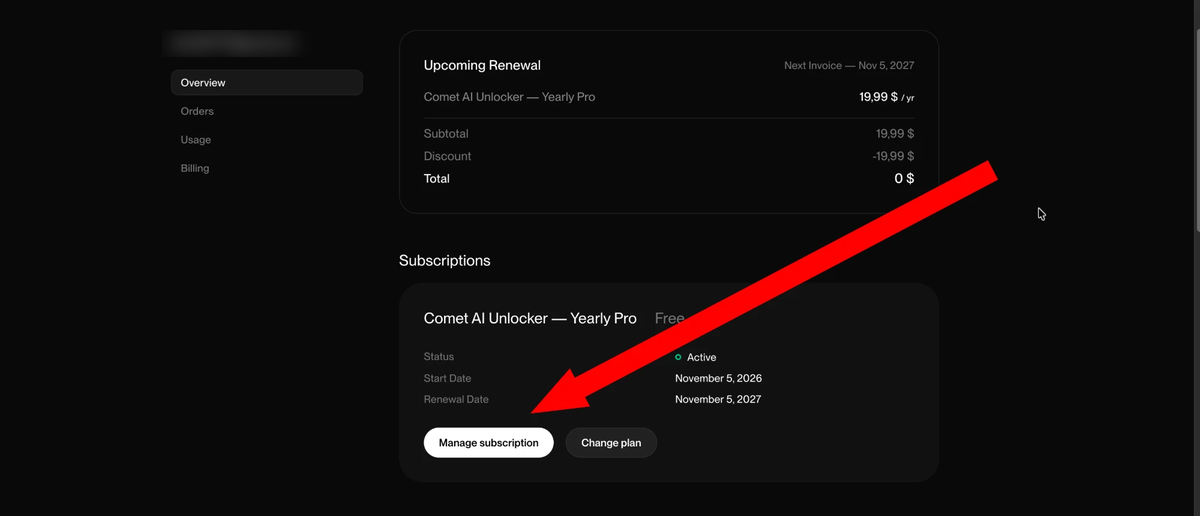
1. Open your subscription
On the portal Overview page click Manage subscription.
2. Copy the key, download the app
In Benefit Grants press the arrow to download the macOS app and Copy to copy your license key (starts with ABP-PRO-).
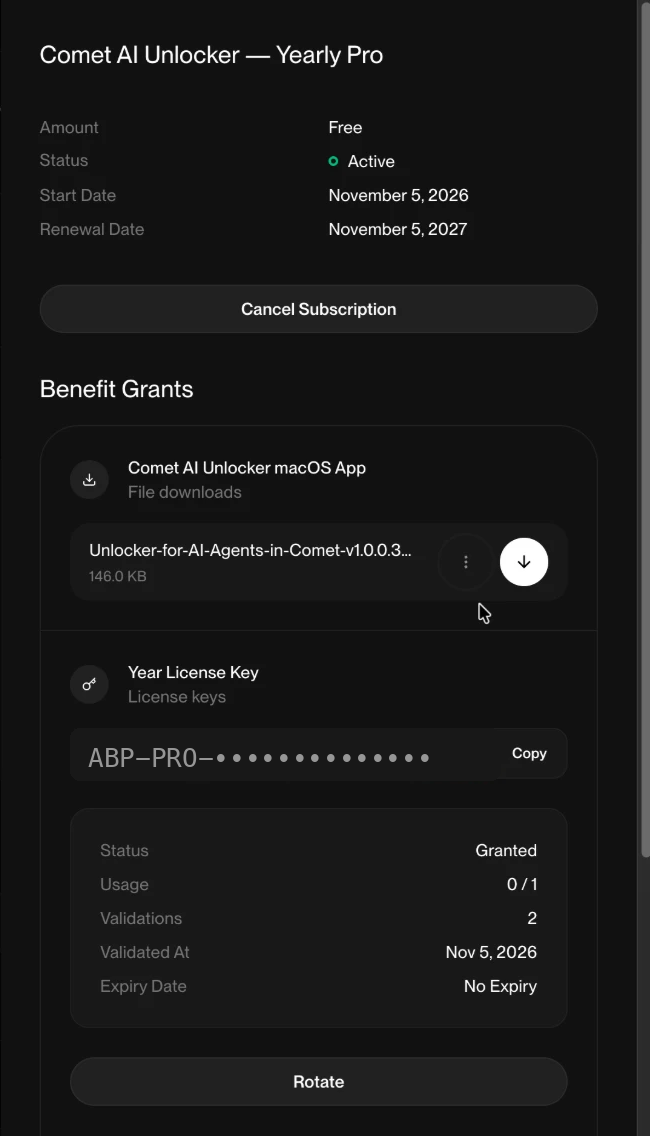
- Unzip the downloaded file and double-click Unlocker for AI Agents in Comet.
- Paste your license key when asked. The key works on one Mac.
- Restart Perplexity Comet, click the extension icon: the status shows UNLOCKED.
The app is signed and notarized by Apple, so macOS opens it without warnings. Need help? Reply to your Polar receipt email.